LCD Display 12864 #
Grafický LCD display QC12864 s rozlíšením 128x64 pixlov je možné riadiť pomocou paralelného alebo sériového SPI rozhrania.
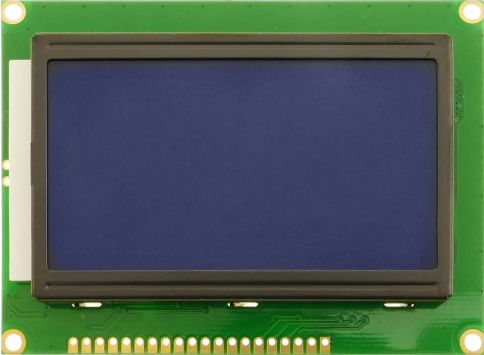
Obr. 52 Displej QC12864.#
Popis #
Označenie vývodov #
GND     Ground
VCC     Module power supply – 5 V
VO      LCD Contrast
RS      Register Select Pin
R/W     Write/ Read selection
E       Enable Signal
D0...D7 Data Bus
PSB     Interface selection
            0 for serial communication
            1 for 8-bit parallel communication
NC      Not Connected
RST     Reset
Vout    LCD Voltage Output (Vout < 7V)
BLA     Power Supply for Backlight+
BLK     Power Supply for Backlight-
Programovanie #
Zdrojový kód knižnice
  1"""
  2v 0.2.4
  3
  4lcd12864 is a FrameBuffer based MicroPython driver for the graphical
  5LiquidCrystal LCD12864 display (also known as DFR0091).
  6
  7Connection: SPI
  8Color: 1-bit monochrome
  9Controllers: Esp8266, Esp32, RP2
 10
 11Project path: https://github.com/r2d2-arduino/micropython-lcd12864
 12
 13Author: Arthur Derkach
 14MIT License
 15
 16LCD -> ESP8266
 17--------------
 18GND -> GND
 19VCC -> 5V
 20V0
 21RS  -> D8 GPIO15 CS/SS
 22R/W -> D7 GPIO13 MOSI
 23E   -> D5 GPIO14 SCK
 24DB0
 25..
 26DB7
 27PSB -> GND
 28NC
 29RST -> 5V
 30VOUT
 31BLA -> 3.3V
 32BLK -> GND
 33
 34"""
 35
 36from machine import Pin
 37from time import sleep_us
 38from framebuf import FrameBuffer, MONO_HMSB, MONO_HLSB
 39
 40#print(gc.mem_alloc())
 41
 42LCD_CLS          = const(0x01)
 43LCD_HOME         = const(0x02)
 44LCD_ADDR_INC     = const(0x06)
 45LCD_DISPLAY_ON   = const(0x0C)
 46LCD_DISPLAY_OFF  = const(0x08)
 47LCD_CURSOR_ON    = const(0x0E)
 48LCD_CURSOR_BLINK = const(0x0F)
 49LCD_ENTRY_MODE   = const(0x04) # +0..3
 50LCD_SHIFT_CTRL   = const(0x10) # : 10, 14, 18, 1C
 51SET_CGRAM_ADDR   = const(0x40) # +0..3F
 52SET_DDRAM_ADDR   = const(0x80) # +0..3F
 53
 54LCD_BASIC        = const(0x30)
 55LCD_EXTEND       = const(0x34)
 56LCD_GFXMODE      = const(0x36)
 57LCD_TXTMODE      = const(0x34)
 58LCD_STANDBY      = const(0x01)
 59LCD_ADDR         = const(0x80)
 60LCD_COMMAND      = const(0xF8)
 61LCD_DATA         = const(0xFA)
 62
 63LCD_WIDTH  = const(128)
 64LCD_HEIGHT = const(64)
 65
 66
 67class LCD12864_SPI( FrameBuffer ):
 68    def __init__( self, spi, cs_pin, rst_pin = None, rotation = 0 ):
 69        """ Constructor
 70        Args
 71        spi  (object): SPI
 72        cs   (object): CS pin (Chip Select)
 73        rotation (int): Display rotation 0 = 0 degrees, 1 = 180 degrees
 74        """
 75        self.spi = spi
 76        self.cs  = Pin( cs_pin, Pin.OUT, value = 0 )
 77
 78        if (rst_pin):
 79            Pin( rst_pin, Pin.OUT, value = 1 )
 80        # Other properties
 81        self.height = LCD_HEIGHT
 82        self.width  = LCD_WIDTH
 83
 84        self._rotation = rotation
 85        self.font = None
 86        self.text_wrap = False
 87
 88        #order of bites in buffer depending of screen position
 89        fb_format = MONO_HLSB
 90        if (rotation == 1):
 91            fb_format = MONO_HMSB
 92
 93        # Buffer initialization
 94        self.buffer = bytearray( LCD_WIDTH * LCD_HEIGHT // 8 )
 95        super().__init__( self.buffer, self.width, self.height, fb_format )
 96
 97        self.init()
 98
 99    def init(self):
100        """ Initialize the LCD controler """
101        self.cs.value( 1 )
102
103        self.write_command( LCD_BASIC ) # basic instruction set
104        #self.write_command( LCD_EXTEND )
105        self.write_command( LCD_CLS ) #clear
106        sleep_us(50) #wait for clearing
107
108        self.write_command( LCD_ADDR_INC )
109        self.write_command( LCD_DISPLAY_ON ) # display on
110
111        self.cs.value( 0 )
112
113
114    def clear( self ):
115        """ Clear display """
116        self.cs.value( 1 )
117        self.write_command( LCD_BASIC )
118        self.write_command( LCD_CLS ) #clear
119        sleep_us(50)
120
121        self.cs.value( 0 )
122
123    def write_command( self, cmd ):
124        """ Sending a command to the display
125        Args
126        cmd (int): Command number, example: 0x2E
127        """
128        self.spi.write( bytearray( [ LCD_COMMAND, cmd & 0xF0, (cmd & 0x0F) << 4] ) )
129
130    def write_data( self, data ):
131        """ Sending a data to the display
132        Args
133        cmd (int): Command number, example: 0x2E
134        """
135        self.spi.write( bytearray( [ LCD_DATA, data & 0xF0, (data & 0x0F) << 4] ) )
136
137    def set_font(self, font):
138        """ Set font for text
139        Args
140        font (module): Font module generated by font_to_py.py
141        """
142        self.font = font
143
144    def set_text_wrap(self, on = True):
145        """ Set text wrapping """
146        if on:
147            self.text_wrap = True
148        else:
149            self.text_wrap = False
150
151    def draw_text(self, text, x, y, color = 1):
152        """ Draw text on display
153        Args
154        x (int) : Start X position
155        y (int) : Start Y position
156        """
157        x_start = x
158        screen_height = self.height
159        screen_width  = self.width
160
161        font = self.font
162        wrap = self.text_wrap
163
164        if font == None:
165            print("Font not set")
166            return False
167
168        for char in text:
169            glyph = font.get_ch(char)
170            glyph_height = glyph[1]
171            glyph_width  = glyph[2]
172
173            if char == " ": # double size for space
174                x += glyph_width
175
176            if wrap and (x + glyph_width > screen_width): # End of row
177                x = x_start
178                y += glyph_height
179
180            #if y + glyph_height > screen_height: # End of screen
181            #    break
182
183            self.draw_bitmap(glyph, x, y, color)
184            x += glyph_width
185
186    @micropython.viper
187    def draw_bitmap(self, bitmap, x:int, y:int, color:int = 1):
188        """ Draw a bitmap on display
189        Args
190        bitmap (bytes): Bitmap data
191        x      (int): Start X position
192        y      (int): Start Y position
193        color  (int): Color 0 or 1
194        """
195        fb = FrameBuffer( bytearray(bitmap[0]), bitmap[2], bitmap[1], MONO_HLSB )
196        self.blit( fb, x, y, 1 - color )
197
198    @micropython.viper
199    def show( self ):
200        ''' Send FrameBuffer to lcd '''
201        #Set text mode
202        self.cs.value( 1 )
203        self.write_command( LCD_GFXMODE )
204
205        buffsize = LCD_WIDTH * LCD_HEIGHT // 8
206        rotation = int(self._rotation)
207        buffer = ptr8( self.buffer )
208        row_buffer = bytearray( 16 * 3 )
209        row_ptr = ptr8(row_buffer)
210
211        for y in range(64):
212            x_addr = LCD_ADDR
213            y_addr = LCD_ADDR + y
214
215            if y > 31:
216                x_addr += 8
217                y_addr -= 32
218
219            #Set addres position
220            self.spi.write( bytearray( [ LCD_COMMAND, y_addr & 0xF0, (y_addr & 0x0F) << 4,
221                                         LCD_COMMAND, x_addr & 0xF0, (x_addr & 0x0F) << 4 ] ) )
222            y_offset = y * 16
223            #Send buffer to display
224            for x in range(16):
225                pos = y_offset + x
226                if ( rotation == 1 ):
227                    pos = buffsize - 1 - pos
228
229                data = buffer[ pos ]
230
231                x_offset = x * 3
232                row_ptr[ x_offset     ] = LCD_DATA
233                row_ptr[ x_offset + 1 ] = data & 0xF0
234                row_ptr[ x_offset + 2 ] = (data & 0x0F) << 4
235
236            self.spi.write( row_buffer )
237
238        self.cs.value( 0 )
API Funkcie
clear( self ): - Clear display
set_font(self, font): - Set font for text
set_text_wrap(self, on = True): - Set text wrapping
draw_text(self, text, x, y, color = 1): - Draw text on display
draw_bitmap(self, bitmap, x, y, color = 1): - Draw a bitmap on display
show( self ): - Send frameBuffer to lcd
other framebuffer functions -
see more on https://docs.micropython.org/en/latest/library/framebuf.html#module-framebuf
Demo program
from pyb import SPI
from lib.lcd12864_spi import *
spi = SPI(2, SPI.CONTROLLER, baudrate=100000, polarity=1, phase=1, crc=None)
lcd = LCD12864_SPI( spi = spi, cs_pin = 'D6', rst_pin = 'D2', rotation = 1 )

lcd.text( "123.456", 50, 25, 1 )
lcd.rect( 0, 0, 128, 64, 1 )
lcd.rect( 3, 3, 128-6, 64-6, 1 )
lcd.line(0,0,20,30,1)
lcd.ellipse(30,30,15,15,1)
lcd.show()